
Many users encounter a common problem when selecting and using RGB LED neon flex strip: how to control their color effects? Some only know the simplest blinking mode, some don’t know how to connect to the app, and some even buy the wrong device because they don’t understand the controller’s properties.
This article will help you understand how to control the color effects of RGB LED neon flex strip comprehensively, from principles to control methods, from equipment to application scenarios, and will help you choose the most suitable control system for your project.
How Do RGB LED Neon Flex Strip Mix to Create Millions of Colors?
RGB LED neon flex strip consist of three types of LED chips: red (R), green (G), and blue (B). A compatible controller is required for dimming. More information, pls read Can the Color of LED Neon lights Change?
The brightness of each color can be adjusted by controlling the current or using PWM (Pulse Width Modulation). When the three colors are combined at different brightness levels, virtually infinite color variations can be created.
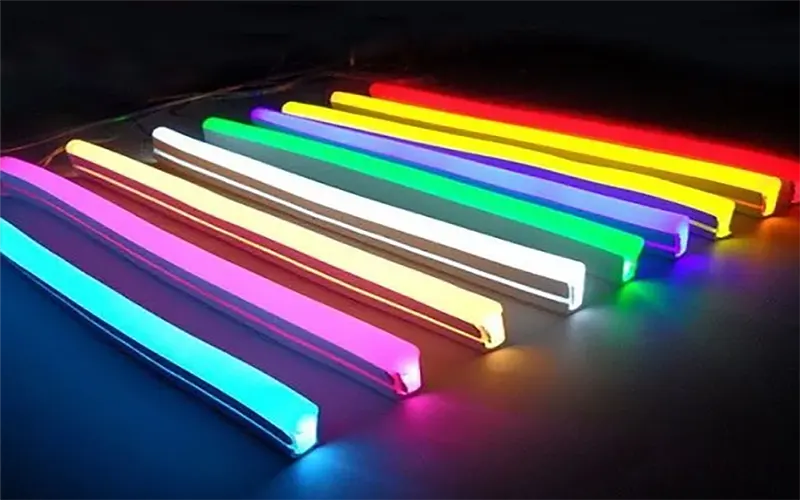
For example:
- 100% Red + 100% Green = Yellow
- 100% Red + 100% Blue = Purple
- 50% Red + 50% Green + 50% Blue = Soft White Light
- 256 levels of brightness adjustment enable 16,777,216 colors
By changing countless different combinations of the brightness of these three colors, most colors visible to the human eye can be simulated.
What are the Common Types of RGB Controllers?
The controller determines the versatility of RGB LED neon flex strip. Below are common controller categories and their characteristics. Remote control, Wi-Fi, and Bluetooth connectors are available.
Infrared Remote Control
This is the most common and lowest-cost controller. It transmits infrared signals point-to-point, is easy to operate, and typically offers 16 or 20 preset colors and several dynamic modes.
The disadvantages are that the remote must be pointed directly at the receiver, it cannot penetrate walls, and its control distance and flexibility are limited.
RF Remote Control
RF remote controls use radio frequency signals, solving the directional problem of infrared remote controls. You can control the light strip from any corner of the room without aiming, and the signal penetration is stronger. The control range is wider (usually over 20 meters).
Wi-Fi Controller
This is the starting point for smart control, and many young people now appreciate this feature. Simply connect the controller to your home Wi-Fi network. Pls check Can RGB LED Strip Lights Be Controlled By APP?
You can then use a mobile app for comprehensive control, including unlimited color selection, custom scenes, music rhythms, and timed on/off switching.
The biggest advantage is remote control support, allowing you to manage the lights via the internet even when you’re not home. It’s also typically integrated into the smart home ecosystem.
Bluetooth Controllers
Bluetooth controllers pair directly with an LED strip via a mobile phone’s Bluetooth connection, enabling short-range control. Their key advantages lie in rapid connectivity, simple setup, and—crucially—no reliance on a home Wi-Fi network. More details, pls check How to Sync LED Lights to Music Bluetooth?
Functionally, they are similar to Wi-Fi controllers, offering extensive App-based control capabilities; however, their control range is limited (typically within 10 meters), and they do not support remote access.
Smart Home Control
This does not represent a distinct category of controller in itself, but rather serves as an advanced feature of Wi-Fi or Bluetooth controllers. By integrating LED light strips into platforms such as Apple HomeKit or Google Home, you can enable voice control and create sophisticated automation scenes.
For example: “Alexa, set the light strip to warm white,” or configure an “Away Mode” to automatically switch off all lights.
DMX and SPI Address Code Control
This is the domain of professional stage lighting and large-scale commercial projects. For the vast majority of home and individual users, the first four controllers are perfectly adequate.
- DMX512: A professional digital lighting control protocol that can precisely control up to 512 “addresses” (i.e., LED beads or light segments) to achieve extremely complex and synchronized light shows. Requires a dedicated DMX controller and decoder.
- SPI: Can control each individual LED bead, achieving pixel-level animation effects such as chasing and rainbow waves. Commonly used in large LED screens and high-end architectural lighting.
How to Control the Color Effects of an RGB Neon Light Strip Using a Remote Control?
For users who don’t rely on Wi-Fi or smart systems, a remote control remains the fastest and most intuitive control method.
Static Color Selection
Most remote controls (IR or RF) offer 8 to 20 preset static color buttons (e.g., pure red, pure green, pure blue, yellow, purple, white). Simply press the corresponding button to switch colors instantly.
Custom Color Mixing and Dimming
Remote controls typically have six dedicated adjustment buttons: R+ / R-, G+ / G-, B+ / B-.
Operation Method: First, select a base color (e.g., press the white button). Then, increase the brightness ratio of red, green, and blue using R+ / G+ / B+, and decrease the ratio using R- / G- / B-. Through this fine-tuning, you can mix your preferred custom colors.
Brightness Adjustment: Remote controls usually have a dedicated “Brightness +/-” or sun symbol button for increasing or decreasing the overall brightness of the light strip.
Dynamic Modes and Speed Control
Remote controls typically have several preset dynamic modes, such as:
- Flash: Colors alternate rapidly.
- Fade: Colors transition slowly and smoothly. Strobe: A specific color flashes on and off rapidly.
- You can use the “Speed +/-” or “Mode +/-” buttons to adjust the speed of these dynamic modes to match different atmosphere requirements.
How to Control an RGB LED Neon Flex Strip with a Mobile App?
Using a mobile app (Wi-Fi or Bluetooth) is currently the most mainstream and powerful control method. The setup process is simple and feature-rich:
Initial Connection and Setup (Wi-Fi Example)
- Hardware Connection: Properly connect the RGB neon light strip and the power supply to the Wi-Fi controller.
- App Download: Scan the QR code found in the controller’s instruction manual or search for the companion app in your device’s app store.
- Pairing: Follow the prompts within the app to set the controller to pairing mode (typically achieved by long-pressing the power button or a specific designated button); then, select your home Wi-Fi network within the app and enter the password.
Core App Control Features
- Color Selection Wheel: Simply drag your finger across the screen to precisely select any one of 16 million colors.
- Saturation/Brightness Adjustment: Dedicated sliders allow for independent adjustment of color saturation (vividness) and brightness.
- Preset Scenes/Modes: Switch instantly between preset color combinations (e.g., Reading, Party, Candlelight).
- Music Sync: Enables the lights to pulse and change color in rhythm with audio captured by your phone’s microphone or music player.
Mobile App control significantly expands both the versatility and practical utility of RGB LED neon light strips.
How to Choose the Right RGB Control System for Your Needs?
If you have purchased RGB LED neon flex strip, you will certainly need a suitable RGB control system. The selection of an RGB control system should be based on the following key factors:
Usage Scenario
- Home Use: Wi-Fi, RF
- Commercial Lighting: DMX or SPI
- Small Rooms: Bluetooth or IR Remote
Control Range
- IR: 2–5 meters
- RF: 10–30 meters
- Bluetooth: 8–15 meters
- Wi-Fi: Unlimited range (supports remote control)
Functional Requirements
- If features such as music synchronization, remote control, or smart home integration are required, prioritize the selection of a Wi-Fi controller.
- If only basic color adjustment and brightness control are needed, an RF controller is sufficient.
Project Scale
- Small Projects: Infrared, RF, Bluetooth
- Large-scale Lighting Projects: DMX or SPI
Conclusion
Controlling the color effects of RGB LED neon flex strip is not as complex as it might seem. From remote controls to mobile apps, and from Wi-Fi to DMX systems, each method is suited to different scenarios and requirements. By simply understanding the principles of RGB color mixing, selecting the appropriate controller, and tailoring your choices to the scale of your project, you can create a unique, stable, and professional-grade lighting atmosphere.
If you are currently planning your own RGB LED neon strip project but are unsure how to select the right controller or strip type, please feel free to contact us.
FAQs
This is usually due to incorrect wiring or a damaged signal cable. Check the R/G/B signal cables for secure connections. Also check the controller output for looseness, and for any breaks or poor soldering in the LED strip.
We need to check for loose wiring or controller compatibility. Try re-pairing the remote or restarting the controller.
RF controllers may interfere; you’ll need to suggest different groupings. You need to plan in advance which light strips will connect to which controller.
You need to restart the device and ensure you are within 1-3 meters of the controller. Check if the app has granted Bluetooth and location permissions.
Check to ensure you are using a 2.4GHz network, verify that the router signal is stable, and make sure the controller is positioned close to the router.